You know that feeling when you're in the middle of an important video call, a crucial work upload, or just settling in to binge the latest hit series, and suddenly the video freezes, the audio stutters, and the dreaded buffering icon appears? It’s a modern-day frustration that can grind your productivity and leisure to a complete halt. A weak WiFi signal is more than a minor inconvenience; it's a genuine household problem in our hyper-connected world.
The causes of poor wireless performance are numerous and often interlinked. It's rarely just one thing. Your internet experience is a delicate chain, and any weak link—from your Internet Service Provider's bandwidth to the placement of your router, and even the construction materials of your home—can cause the entire system to falter. Before you angrily call your ISP to demand a solution, it's worth taking a methodical, do-it-yourself approach to diagnosing and strengthening your connection. Often, the power to fix the problem is already in your hands.
Begin with the most fundamental step: a simple reboot. It sounds almost too trivial to be effective, but you would be amazed at how many connectivity issues are resolved by turning your modem and router off, waiting for a full minute, and then turning them back on. These devices are essentially small, specialized computers, and like any computer, they can suffer from memory leaks, software glitches, and overheating from being run continuously for weeks or months. A reboot clears the cache, resets the network connections, and often provides an immediate, if sometimes temporary, boost in performance. Make this your first line of defense whenever things start to feel sluggish.
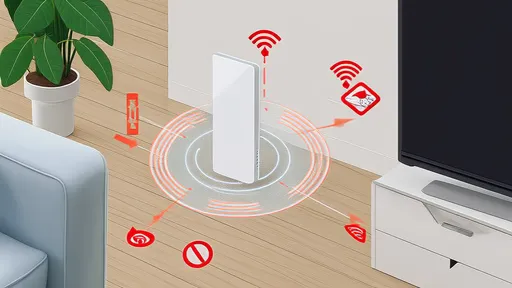
Once you've ruled out a simple glitch, it's time to play detective with your router's physical location. Where you place this little box of magic is arguably the single most important factor in determining your WiFi coverage. Radio waves, which is what WiFi is, can be surprisingly fragile. They don't like traveling through thick walls, especially those made of concrete, brick, or metal lath. They get confused by large metal objects like refrigerators or filing cabinets. They can even be absorbed by water, meaning that fish tanks and, curiously, your own body can act as signal blockers.
The ideal placement is a central location in your home, elevated off the floor—on a shelf or a table—and out in the open, not tucked inside a media cabinet or buried behind a stack of books. Avoid corners, closets, and basements. Think of your router like a lamp; you wouldn't put a lamp in a closet and expect it to light up your entire living room. The goal is to give its signal a clear, unobstructed path to all the devices that need it. If your home has multiple floors, placing the router on the main floor, perhaps near the ceiling, can help distribute the signal more evenly upstairs and down.
If repositioning your router yields some improvement but not enough to cover that dead zone in the bedroom or the backyard patio, you've entered the realm of signal expansion. This is where many people's eyes glaze over at the technical jargon, but the concepts are actually quite straightforward. You have a few powerful options here, each with its own strengths.
A WiFi extender or repeater is a common solution. This device grabs the existing WiFi signal from your router, amplifies it, and then rebroadcasts it further into your home. It's a quick and relatively inexpensive fix. However, there is a significant trade-off: most basic extenders effectively cut your bandwidth in half because they must use the same radio to both talk to the router and talk to your devices. This can lead to slower speeds, even if the signal strength bars on your phone look full.
A more robust and modern solution is a mesh network system. Instead of a single router trying to do all the work, a mesh system uses multiple units (nodes) placed throughout your home that all talk to each other seamlessly, creating a single, blanket-like network. Your device automatically connects to the strongest node as you move around, and the backhaul communication between nodes is often handled on a dedicated radio band, preventing the speed loss associated with traditional extenders. While more expensive, a mesh system is the gold standard for eliminating dead zones in medium to large homes.
For the ultimate in stability and speed, especially for a stationary device like a desktop PC, gaming console, or smart TV, nothing beats a wired Ethernet connection. Running a long cable might not be aesthetically pleasing, but it provides a direct, dedicated pipeline to your network, completely free from the interference and congestion that plagues wireless signals. The difference in latency (lag) for online gaming and the consistency for 4K video streaming is night and day. If running a cable through walls is not an option, consider Powerline adapters, which use your home's existing electrical wiring to transmit network data. Their performance can vary based on the age and quality of your wiring, but they can be a fantastic workaround.
Beyond hardware, there's a digital layer to optimize. Your router broadcasts on specific channels, and if you live in an apartment building or a densely packed neighborhood, your router is likely competing with dozens of others on the same default channels, creating a traffic jam of radio noise. Accessing your router's admin settings (usually by typing an IP address like 192.168.1.1 into a web browser) allows you to manually select a less congested channel. Tools like WiFi analyzer apps on your phone can show you which channels your neighbors are using so you can pick a clearer one. Furthermore, if your router is dual-band, make sure you are utilizing the 5 GHz band for devices that are closer to the router, as it offers faster speeds and less interference, saving the longer-range but slower 2.4 GHz band for devices further away.
Finally, it's worth considering the age and capability of your router itself. Technology moves fast. A router that was top-of-the-line five or eight years ago is now a relic, lacking support for modern WiFi standards like WiFi 6, which is designed specifically to perform better in crowded environments with multiple devices. If you're still using the cheap, combo modem/router unit your ISP provided when you first signed up, you are almost certainly leaving performance on the table. Upgrading to a current-generation router, or better yet, a mesh system, can feel like getting a whole new internet service, even if your actual internet plan hasn't changed.
Tackling a weak WiFi signal requires a bit of patience and systematic troubleshooting. There's no single magic bullet, but a combination of strategic placement, modern hardware, and savvy configuration can transform your home network from a source of frustration into a reliable and powerful utility. The strength of your connection is the foundation of your modern digital life at home; it's worth investing a little time and effort to make it rock solid.
By /Aug 20, 2025

By /Aug 20, 2025

By /Aug 20, 2025

By /Aug 20, 2025

By /Aug 20, 2025

By /Aug 20, 2025

By /Aug 20, 2025

By /Aug 20, 2025

By /Aug 20, 2025
By /Aug 20, 2025

By /Aug 20, 2025
By /Aug 20, 2025

By /Aug 20, 2025

By /Aug 20, 2025

By /Aug 20, 2025

By /Aug 20, 2025

By /Aug 20, 2025

By /Aug 20, 2025

By /Aug 20, 2025

By /Aug 20, 2025