In today's hyper-connected world, a strong and reliable WiFi signal is no longer a luxury but a necessity. Whether you're working from home, streaming your favorite shows, or simply browsing the web, a weak signal can be a source of immense frustration. Many of us instinctively blame our internet service provider or the age of our router, but the culprit is often much closer to home—literally. The physical placement of your router is arguably the single most critical factor influencing the strength and reach of your wireless network. It’s a detail often overlooked in the rush to get online, tucked away on a dusty shelf or hidden behind a stack of books. However, where you position this humble box of technology can mean the difference between seamless connectivity and a digital dead zone.
The science behind WiFi is fascinating. Your router emits radio waves, a form of electromagnetic radiation, to create a local area network. These waves, while powerful, are susceptible to a myriad of obstacles and interferences present in a typical household. They can be absorbed, reflected, or blocked by walls, furniture, and even other electronic devices. Think of your router not as a device that "sends out internet," but as a beacon of light. If you hide that beacon in a closet or behind a thick concrete wall, its light will be dim and its reach short. To illuminate your entire home with a strong, clear signal, the beacon needs to be placed in the open, elevated, and centrally located. It’s a simple principle with profound implications for your daily digital life.
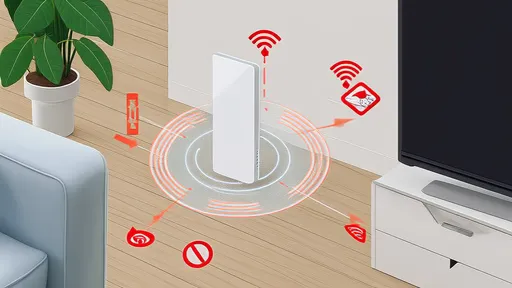
One of the worst places you can possibly put your router is on the floor. Radio waves propagate best outward and slightly downward from their source. By placing the router on the floor, you are essentially aiming a significant portion of your signal into the foundation of your house, wasting its potential. Carpets, floorboards, and concrete slabs will absorb and weaken the signal before it even has a chance to travel horizontally to your devices. For the best performance, elevate your router. Placing it on a high shelf, a tall piece of furniture, or even mounting it on a wall can dramatically improve its range. This higher vantage point allows the signal to broadcast over obstacles like sofas and tables, providing clearer coverage to the devices you use while sitting or standing.
Another common but detrimental location is inside a closed cabinet or a closet. We often do this for aesthetic reasons, to hide unsightly wires and blinking lights. However, this practice is akin to trying to hold a conversation from inside a sealed box. The materials of the cabinet—wood, metal, or even thick plastic—act as barriers that significantly dampen the signal strength. The doors create an additional obstacle that the waves must penetrate, reducing their power before they even enter the room. For WiFi signals to thrive, they need open space. Your router should be out in the open, free from physical enclosures that can stifle its broadcast and create pockets of poor connectivity throughout your home.
It might seem convenient to place your router right next to other electronic gadgets, perhaps on an entertainment center alongside your smart TV, game console, and speakers. This, however, is a recipe for interference. Many household electronics operate on the same 2.4 GHz frequency band as most WiFi routers. Devices like cordless phones, microwave ovens, baby monitors, and Bluetooth speakers all compete for airspace, creating electronic "noise" that can disrupt your WiFi signal. This phenomenon is known as interference. The closer your router is to these devices, the stronger this disruptive noise becomes. To ensure a clean and stable connection, give your router some breathing room. Keep it several feet away from other major electronics to minimize signal competition and cross-talk.
While it might be tempting to shove the router into a remote corner of the house to keep it out of sight, this is a surefire way to create WiFi dead zones. WiFi signals weaken the farther they travel, and they are particularly bad at penetrating certain building materials. Thick masonry walls, metal frameworks, and even large appliances like refrigerators and washing machines can act as near-impenetrable shields for radio waves. Placing your router in a far-off utility room or a garage, especially if it has concrete walls, will likely leave the rest of your home with a pitifully weak connection. The ideal strategy is central placement. By positioning your router near the center of your living space, you minimize the distance the signal must travel to reach every corner, ensuring more uniform coverage and reducing the number of obstacles it encounters along the way.
Finally, be mindful of large metallic objects and water sources. Mirrors, filing cabinets, and metal shelving can reflect and scatter WiFi signals, creating an unpredictable coverage pattern. Similarly, large aquariums or even water pipes inside walls can absorb a surprising amount of radio wave energy because water is highly effective at doing so. Avoid placing your router directly opposite a large mirror or immediately next to a big fish tank. A little strategic thinking about what is in the immediate vicinity of your router can go a long way in optimizing its performance. By understanding these simple principles of signal propagation and avoiding these common placement pitfalls, you can unlock the full potential of your WiFi network without spending a dime on expensive extenders or new equipment.
By /Aug 20, 2025

By /Aug 20, 2025

By /Aug 20, 2025

By /Aug 20, 2025

By /Aug 20, 2025

By /Aug 20, 2025

By /Aug 20, 2025

By /Aug 20, 2025

By /Aug 20, 2025

By /Aug 20, 2025

By /Aug 20, 2025
By /Aug 20, 2025

By /Aug 20, 2025

By /Aug 20, 2025

By /Aug 20, 2025

By /Aug 20, 2025

By /Aug 20, 2025

By /Aug 20, 2025

By /Aug 20, 2025

By /Aug 20, 2025